--- 🚀 How to Quickly Generate Revenue from a Business Directory Using ListingPro

ListingPro empowers directory owners to start generating revenue almost immediately after launch by leveraging its built-in monetization tools — such as paid listings, claim fees, and ad campaigns — combined with proven pricing strategies and targeted outreach. Rapid setup, flexible payment gateways, and scalable revenue models make it a top choice for entrepreneurs seeking fast returns.
Introduction
Launching a business directory can be a lucrative venture — if you choose the right platform and implement effective monetization strategies from day one. ListingPro, a leading all-in-one WordPress directory solution, is designed to help entrepreneurs and agencies quickly build, launch, and monetize online directories with minimal technical overhead. This article provides a step-by-step guide to rapidly generating revenue using ListingPro, drawing on platform features, real-world success stories, and industry best practices.
1. Understanding ListingPro: The Foundation for Fast Monetization
ListingPro is a comprehensive WordPress directory theme that includes everything you need to create, manage, and monetize a business directory — no extra plugins required. Its core strengths for revenue generation include:
Paid Pricing Plans: Unlimited free and paid listing tiers
Paid Claim Listings: Businesses pay to claim and manage their profiles
Ad Campaigns: Built-in system for selling featured placements and banners
Google AdSense Integration: Passive ad revenue from site traffic
Global Payment Gateways: Stripe, PayPal, 2Checkout, and regional options
Premium Add-ons: Mobile apps, digital wallet for commissions, and more
Highlight:*
ListingPro’s one-time purchase model ($69) includes all core monetization features, making it cost-effective and easy to launch .*
2. Proven Revenue Streams for Quick Wins
A. Paid Listings & Subscription Plans
How it Works: Offer businesses the option to upgrade to premium listings for enhanced visibility, additional features, or priority placement.
Implementation: Set up tiered plans (e.g., Free, Silver, Gold) with escalating benefits.
Why It’s Fast: Businesses seeking immediate exposure are likely to pay for upgrades, especially if you offer introductory discounts or bonuses.
B. Paid Claim Listings
How it Works: Pre-populate your directory with business listings and allow owners to claim and verify their profiles for a fee.
Implementation: Use ListingPro’s built-in claim system to automate verification and payment.
Why It’s Fast: Businesses are motivated to control their online presence and will pay to manage their listings .
C. Ad Campaigns & Featured Placements
How it Works: Sell ad space (e.g., homepage banners, featured listings) directly to businesses.
Implementation: Use ListingPro’s ad management dashboard to set pricing, duration, and placement.
Why It’s Fast: Businesses value visibility and are willing to pay for prominent placement, especially in niche or local markets .
D. Google AdSense & Passive Ads
How it Works: Integrate AdSense to display ads and earn revenue from directory traffic.
Implementation: Place ads on high-traffic pages for maximum exposure.
Why It’s Fast: Generates passive income as soon as you have visitors .
3. Step-by-Step Guide: Launching for Rapid Revenue
Step 1: Set Up Your Directory and Monetization Features
Install ListingPro and complete the setup wizard.
Configure Payment Gateways: Enable Stripe, PayPal, and any regional gateways to accept payments globally.
Create Tiered Pricing Plans: Clearly differentiate free and paid options.
Enable Paid Claim and Ad Campaign Features: Make these options visible and easy to access for business owners.
Step 2: Populate Your Directory
Import Listings: Use public data or manual research to pre-fill your directory with relevant businesses.
Optimize Listings: Add images, descriptions, and categories to make listings attractive.
Step 3: Outreach and Promotion
Manual Outreach: Contact businesses listed in your directory, offering them the chance to claim and upgrade their profiles.
Highlight Value: Emphasize the benefits of premium listings and featured placements (e.g., more leads, better visibility).
Run Promotions: Offer limited-time discounts or bonuses for early adopters.
Step 4: Activate Ad Campaigns and Google AdSense
Sell Featured Placements: Approach businesses directly or promote ad opportunities on your site.
Integrate AdSense: Place ads on high-traffic pages to start earning passive revenue.
Step 5: Track, Optimize, and Scale
Monitor Performance: Use ListingPro’s dashboards to track revenue, ad performance, and user engagement.
Iterate Pricing: Test different pricing models (flat fee, tiered, value-based) to maximize conversions.
Expand Offerings: As your directory grows, introduce additional revenue streams such as lead generation, memberships, or value-added services.
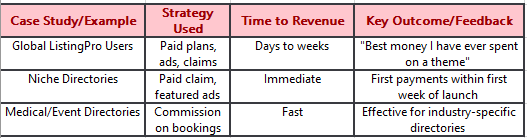
4. Real-World Success Stories & Results
Export as CSV
Key Finding:*
Most ListingPro users report earning their first revenue within days of launch, thanks to integrated checkout and ad systems .*
5. Best Practices for Maximizing Early Revenue
Start with 2–3 Monetization Models: Focus on paid listings, claim fees, and ad campaigns for the fastest returns.
Manual Outreach is Critical: Directly contacting businesses accelerates initial revenue.
Use Value-Based Pricing: Price premium plans based on the value delivered, not just features.
Leverage Promotions: Early-bird discounts and bundled offers drive quick conversions.
Optimize for Mobile: ListingPro’s mobile-first design ensures accessibility for all users.
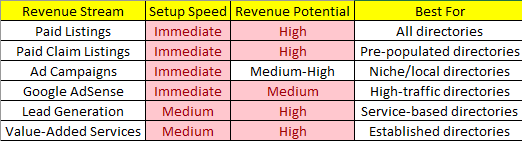
6. Summary Table: Quick Revenue Strategies with ListingPro
Conclusion
In Summary:*
ListingPro’s robust, integrated monetization features — combined with proven outreach and pricing strategies — enable directory owners to generate revenue quickly and scale efficiently. By focusing on paid listings, claim fees, and ad campaigns from the outset, and leveraging ListingPro’s global payment support, you can turn your directory into a profitable business in record time.*


